Holy Quran Offline Reading
- 4.3
- Rating
- 5.00M
- Installs
- Free
- Price

 Analysis by App-foxy
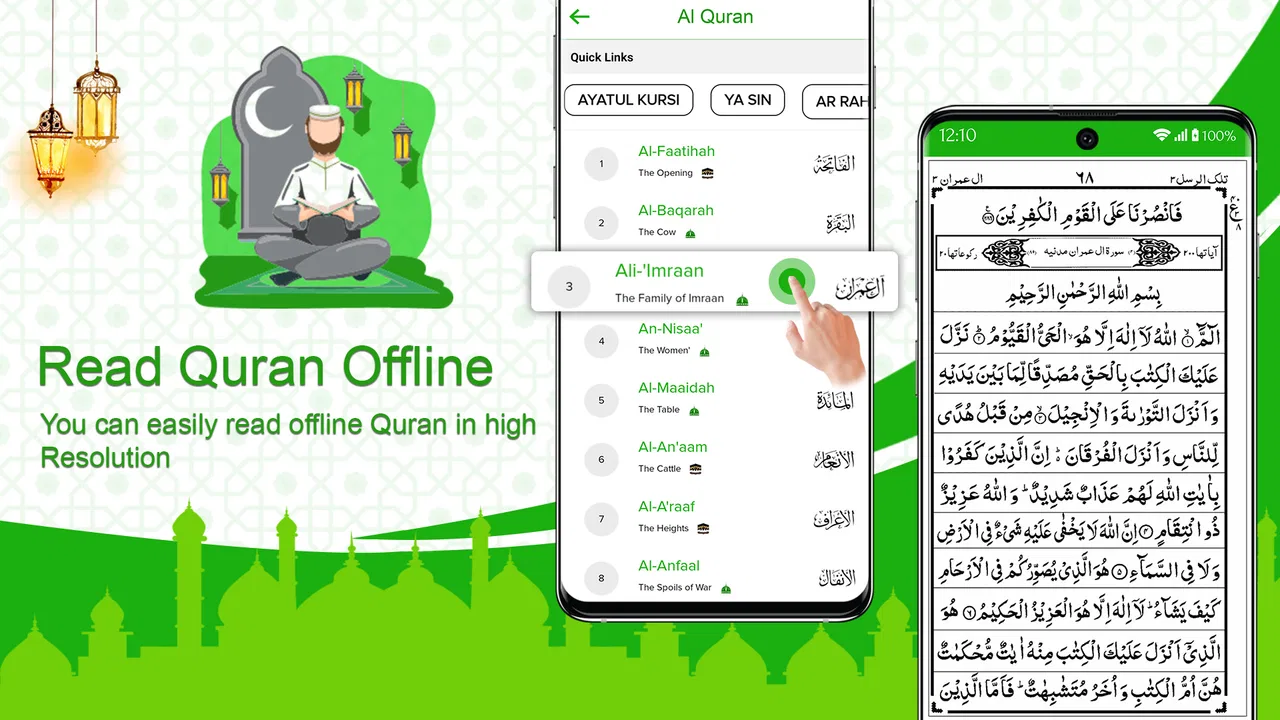
Reading the Quran on a phone can be convenient, but convenience depends heavily on where and how the phone is being used. Holy Quran Offline Reading is built for a simple purpose: giving me a digital Quran-reading experience that feels closer to opening a traditional Quran book, while keeping the app in the Libraries & Demo category rather than turning the experience into a crowded study platform. That focused approach is its main appeal.
In my experience, this is the kind of app I would consider when I want a direct reading session instead of a collection of unrelated tools. The store summary presents it as an app for reading the Quran offline, and that emphasis matters for anyone who travels, spends time in places with unreliable reception, or simply prefers not to depend on a live connection every time they read. At the same time, I would not treat it as a complete replacement for every Quran companion app. Its value is strongest when straightforward reading is the priority.
How the reading experience fits real mobile use
The first thing I notice about a Quran-reading app is whether it gets out of the way. A physical Quran gives the reader a stable, familiar object: open the pages, find the passage, and continue. A phone introduces interruptions that do not exist on paper, including notifications, changing battery levels, and the possibility of a weak network. This app’s stated offline-reading focus addresses one of those problems directly, making it more suitable for quiet reading away from dependable connectivity.
You May Also Like

 AccuWeather: Weather Radar
AccuWeather Review: A Quick, Clear Forecast for Everyday Decisions
For everyday plans, the best forecast is the one you can understand quickly. AccuWeather makes rain timing, radar, and local conditions easy to act on, with a few trade-offs.

 Hill Climb Racing
Why Hill Climb Racing Still Turns Crashes Into One More Run
A tiny car, a bumpy hill and one more upgrade: Hill Climb Racing keeps resurfacing because its simple chaos makes every near-miss feel personal.

 AliExpress - Shopping App
AliExpress Makes Global Shopping Feel Personal, but Shoppers Bear the Risk
AliExpress turns a global marketplace into a pocket-sized discovery engine. Its reach is useful, its shopping loop compelling, and its trade-offs easy to miss.

 Lords Mobile: Kingdom Wars
Lords Mobile Is a Kingdom-Building Routine, Not a Quick Match
A case-by-case verdict on the building, battles, device demands, and social commitments that make Lords Mobile rewarding for some players and exhausting for others.

 PDF Scanner app - TapScanner
TapScanner Makes Paperwork Easier to Capture, Check, and Share
TapScanner makes scanning with a phone feel less like a rescue operation and more like a dependable step in getting work done. Its capture tools are useful, though not flawless.

 Block Blast!
 Shows How Much a Puzzle Game Can Leave Out
A quiet grid game shows why puzzle players increasingly value instant clarity, repeatable skill and low-pressure play—and where the genre still needs to catch up.
More From Our News Desk
View All News


A realistic example would be a commute through areas where reception changes from one moment to the next. If I want to read during that journey, an app designed around offline access is more reassuring than a web page that needs to load every section as I move through it. The same applies in a waiting room, on a flight, in a basement, or at home when I am deliberately limiting mobile data. I can begin a session without making the quality of my reading depend on the signal icon.
That does not mean the phone becomes identical to a printed Quran. The screen is smaller, the device may lock, and incoming alerts can break concentration. I would therefore use a stable reading position, lower distractions before starting, and avoid switching between several apps during the session. Those habits are not special features, but they make a noticeable difference when a digital reading tool is being used as a daily companion rather than opened only for a quick lookup.
The app is free to install, which makes it easy to try without committing money first. It is suitable for Everyone, so it can be considered by a broad range of readers and families. Optional purchases are listed from $1.99 to $14.99 per item, so I would still check the purchase screen carefully before selecting anything extra. The basic cost is approachable, but “free” does not automatically mean that every possible part of the experience is included at no cost.
Where connectivity helps and where it should not matter
Connectivity is most important before a reading session, not necessarily during it. If the app needs to be installed, updated, or prepared on a new device, I would do that while connected to a reliable Wi-Fi network. After that, the offline purpose becomes more useful: the reader can focus on the text rather than wondering whether the next page will load.
This distinction is important because an offline reading promise should not be confused with unlimited online functionality. A reader who expects live translation services, cloud synchronization, audio streaming, social sharing, or constantly updated study material may prefer a broader Quran application. Those are different priorities. Here, I would judge the app mainly by how comfortably it supports reading when the network is unavailable or intentionally ignored.
For data-conscious users, the sensible workflow is simple. Prepare the app at home, keep the phone on its usual low-data settings, and use the reading session without repeatedly refreshing or reopening content. I would also avoid assuming that every optional component behaves exactly like the core reading experience. If a purchase or extra section is presented, I would read its description before confirming it, especially when I am trying to keep both spending and data use predictable.
Using it during travel, prayer breaks, and short sessions
The app makes the most sense in mobile situations where carrying a physical book is inconvenient but concentration is still possible. I can imagine using it during a short break at work, while waiting for an appointment, or during travel when packing light matters. The key benefit is not that a phone is always better than paper; it is that the phone is already with me, and an offline-focused reading app reduces the need to plan around reception.
Short sessions also reveal an important trade-off. A physical Quran encourages a deliberate reading routine, while a phone makes it easy to stop after a few minutes because another notification appears. I would use this app best with a specific intention: choose the passage before opening the device, silence avoidable interruptions, and return to the same reading habit instead of browsing aimlessly. That approach turns the app’s simplicity into an advantage.
For someone who reads Arabic comfortably and mainly wants the Quran itself, a focused reader may be preferable to an app filled with commentary, audio controls, community features, and study dashboards. Extra tools can be useful, but they also create more screens and more reasons to leave the text. I appreciate an app that can remain a quiet reading space, provided its presentation is comfortable on my particular phone.
On the other hand, readers who need extensive accessibility controls, detailed search, translations in several languages, tafsir, memorization tracking, or synchronized progress should compare it with a more feature-rich alternative. I would not choose this app solely because it is popular or free; I would choose it because my main task is reading and I value independence from a network connection.
What happens when a connection fails?
Network failure is one of the clearest tests for an app in this category. With an ordinary online reader, a weak signal can turn a peaceful session into repeated loading attempts. An offline-oriented Quran app is more practical in that situation because the central reading task is intended to remain available without continuous connectivity. That is the reason I see it as more than a simple digital copy: it is useful specifically when online access is inconvenient.
My recommended recovery routine would be to prepare before leaving a reliable connection. Install the current version, open the reading area once, and make sure the content I expect to use is available before entering a low-signal environment. If I move to a new phone or reinstall the app, I would repeat that preparation rather than waiting until the moment I need it. This is a small habit, but it prevents the common mistake of testing offline access only after the network has already disappeared.
There is also a practical difference between losing a connection and losing the device itself. Offline access cannot solve a dead battery, a locked phone, a damaged screen, or an accidental interruption from the operating system. For longer journeys, I would keep the phone charged and avoid treating the app as my only possible reading option. A compact backup plan, such as knowing where I last stopped or carrying a physical copy when appropriate, makes the routine more dependable.
Updates deserve similar attention. The current version is 2.0.1, and I would install updates when convenient rather than postponing them indefinitely. Updating over Wi-Fi is the sensible choice for anyone watching mobile data. I would also avoid updating immediately before an important trip unless I have time to reopen the app and confirm that the reading experience still works as expected. That is not a criticism of this particular release; it is good practice for any app that I rely on away from a network.
Keeping the experience simple and data-conscious
One of the strongest reasons to use an offline reader is control. I do not have to keep a browser tab open, repeatedly reload a page, or spend a reading session waiting for content. For people with limited data plans, unstable home internet, or frequent travel, that can make the difference between reading whenever the opportunity appears and postponing it until conditions are perfect.
I would still separate three moments: preparing the app, reading, and changing settings or purchasing extras. Preparation is where I would use Wi-Fi and verify that the app opens normally. Reading is where I would keep the phone in a distraction-reduced state. Purchases and optional content are where I would slow down, read the wording carefully, and decide whether the addition genuinely supports my goal. This separation keeps the core habit from becoming tangled with account, network, or payment decisions.
The presence of in-app items priced between $1.99 and $14.99 means a cautious user should not assume that every enhancement is automatically necessary. I would begin with the free experience and judge whether it already meets my reading needs. If it does, there is no reason to buy something simply because it is offered. If I do consider an optional item, I would make the decision based on a clear need rather than on the hope that extra cost will solve a problem that is really caused by screen size or phone distractions.
Another useful tip is to treat the app as a reading environment, not as a substitute for every form of Quran study. If I need to compare translations, investigate vocabulary, listen to recitation, or organize a memorization plan, I may use another trusted resource alongside it. That does not weaken this app’s purpose. It clarifies it. A small, focused reader can work well as the dependable reading part of a wider routine.
Who will appreciate it most?
I think this app is a good match for readers who want a Quran on their phone without making connectivity a constant concern. It is particularly suitable for someone who travels regularly, reads in places with inconsistent reception, or wants to reduce mobile-data use. It also makes sense for a person who prefers a familiar book-like reading approach and does not want a heavily social or overly complicated interface.
Families may also find the Everyone age rating reassuring when considering it for general household use. Still, I would personally test the display on the device that will be used most often. Arabic text needs to be comfortable to read for an extended period, and what looks fine on one screen may feel cramped on another. Screen brightness, font comfort, and posture matter just as much as the app’s basic availability.
The developer is JedyApps, and the app has reached over one million installs with an average rating of 4.2 from around thirty thousand ratings. Those figures suggest that it has found a substantial audience, but they do not decide whether it fits my own reading habits. I would use them as a reason to consider the app, then make the final decision after checking how naturally the text fits my eyes and routine.
Readers should look elsewhere if their main requirement is a complete research suite. Someone who depends on advanced study tools, extensive personalization, audio lessons, or a sophisticated progress system may feel limited here. The same is true for a person who dislikes reading on a phone altogether. Offline availability removes one barrier, but it cannot make a small glass screen feel like paper for everyone.
My practical verdict on offline reading
After looking at the app through the lens of connectivity, I see its strongest quality as reliability of purpose. It is not trying to make Quran reading depend on a constant online session. That makes it useful for travel, quiet breaks, and data-conscious routines where a web-based alternative can become frustrating. The free entry point also makes testing straightforward, while the broad age rating keeps it accessible to many readers.
My advice is to install it while connected to Wi-Fi, open it before you need it, and establish a comfortable reading routine on your own phone. Use it for the core task it handles best: reading the Quran when you want a direct, book-like experience and do not want reception to decide whether the session is possible. Keep optional purchases separate from that judgment, and do not expect a focused reader to replace a full study suite.
My final recommendation is conditional but positive: choose Holy Quran Offline Reading if dependable offline reading is central to your needs and simplicity matters more than a long list of study features. I would recommend it to a friend who wants a practical Quran reader for everyday mobile situations. I would point that friend toward another app only if translations, audio, research tools, or detailed personal tracking are more important than a clean reading-first experience.
FAQs for Holy Quran Offline Reading
01Is the Holy Quran Offline Reading app completely free to use?
Yes, the Holy Quran Offline Reading app is free to download and use. While the core features are available without any cost, some advanced options or additional resources might require in-app purchases. It’s always best to check the app’s description on the store for any potential costs.
02Does the app require an internet connection?
No, the primary feature of the Holy Quran Offline Reading app is that it does not require an internet connection. Once downloaded, you can access the entire Quran text offline. However, some additional features, such as audio recitations or updates, might need internet access.
03Are there any customization options for reading the Quran?
Yes, the app offers several customization options. Users can adjust the text size, change the background color, and select from different font styles to enhance readability. These features allow users to personalize their reading experience to suit their preferences.
04Is there a feature for bookmarking or saving verses?
Absolutely. The Holy Quran Offline Reading app allows users to bookmark or save specific verses for easy access later. This feature is particularly useful for those who want to revisit certain passages or for study purposes, ensuring a seamless reading experience.
05What languages are supported by the app?
The app supports multiple languages for translations, making it accessible to a broad audience. While the original Arabic text is available, users can choose from various translations to better understand the content. It's advisable to check the app details for the full list of supported languages.
Pros
- No internet required for access.
- User-friendly interface design.
- Bookmark favorite verses easily.
- Translation in multiple languages.
- Night mode for comfortable reading.
Cons
- Limited audio features available.
- No personalized reading plans.
- Occasional ads in free version.
- Some translations lack clarity.
- Large app size may affect storage.

Holy Quran Offline Reading
Gallery